getUserMedia() Replacement - Chrome Extension
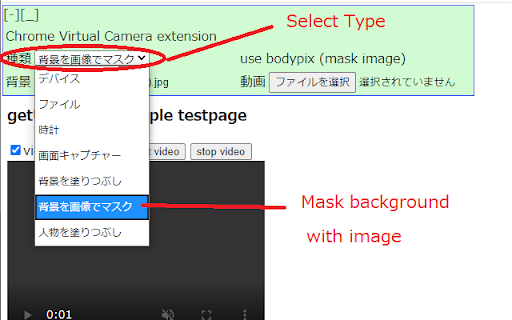
Replaces getUserMedia() with clock, video file, and background masking options.
Screenshots
Overview
This Chrome extension serves as a replacement for the getUserMedia() API, giving developers a reliable alternative for accessing camera and microphone data. It offers several practical input modes, including a built-in clock display, video file playback, and background masking capabilities. This is particularly valuable for testing web applications in environments where real camera hardware isn't available, or when developers need to simulate different video sources for debugging. The extension bridges the gap between development needs and hardware limitations, making it a practical tool for web developers and QA testers working with media-heavy applications.
How to Use
Install the extension, then open the extension options to configure it. You can replace your camera feed with a clock display, a video file, or apply background masking—useful for testing or privacy during video calls.
Core Features
Use Cases
- 1 Virtual meetings with custom backgrounds
- 2 Creating video demonstrations using pre-recorded content
- 3 Adding a clock overlay to a video stream
- 4 Privacy-focused video conferencing with background removal
Frequently Asked Questions
What is the purpose of replacing getUserMedia()?
What is tfjs/body-pix used for?
Quick Info
- Category
- Image Generation & Editing
- Subcategory
- AI Background Remover
- Added on
- Jul 16 2020
- Monthly Visits
- 627
- Rating
- 3.4 / 5.0
- Reviews
- 7




