UPCV

UPCV

“Build a job-ready resume in minutes — not hours.”

5.0
Rating
1
Reviews
6.5K
Visits/mo

Screenshots

UPCV screenshot

Overview

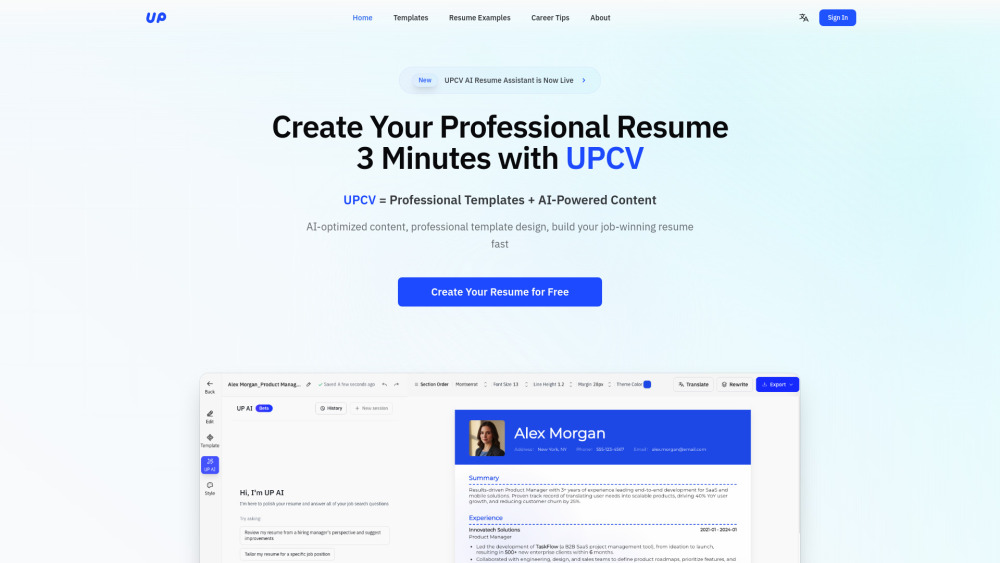
🌍 UPCV — Your AI-Powered Resume Builder for Global Job Seekers Website: https://upcv.io UPCV is an intelligent, modern, and globally friendly AI resume builder designed for job seekers who want a clean, professional, ATS-friendly resume without complexity or high fees. Simple, powerful, and accessible — UPCV helps you create a polished resume in minutes, even if you struggle with writing or don’t know how to format a resume properly. --- 🌟 Key Features 1. 3-Minute AI-Guided Resume Creation No blank-page pressure. UPCV collects your experience through a short, guided conversation and instantly turns it into a professional, ready-to-use resume. - AI-guided questions - Smart content enhancement - Clear achievement rewriting - Real-time resume generation Perfect for users who want a fast, structured, and stress-free resume creation experience. --- 2. Real-Time Visual Editing Everything you write appears instantly in your formatted resume. - Live preview - No exporting to check formatting - No design skills needed - Clean, professional layouts A true “what-you-see-is-what-you-get” resume builder. --- 3. Flexible Modular Layout System (Drag-and-Drop) Customize your resume freely: - Move sections with drag-and-drop - Adjust spacing, fonts, colors - Switch between single-column or two-column styles - Modern, ATS-friendly templates You maintain full creative control while keeping your resume professional and scannable. --- 4. Deep AI Support from Start to Finish UPCV is more than a text polisher — it’s a full AI resume assistant. - Improve clarity, structure, and storytelling - Rewrite achievements to be more measurable and impactful - Create job-specific tailored versions using any job description (JD) - Auto-translate your resume into multiple languages - Ensure ATS-friendly formatting and keywords Designed for global applicants across tech, marketing, operations, finance, design, and more. --- 5. Multi-Version Resume Management Manage all your targeted resumes in one place. - One master resume → many tailored versions - Switch between job directions instantly - Ideal for people applying across multiple roles No more rewriting the same resume again and again. --- 6. Stable, High-Performance, and Multi-Platform - Fast rendering - Reliable autosave - High-quality PDF export - Works on Web + Mobile - Cloud sync across devices Built for both beginners and professionals who need speed and stability. --- 7. Free to Use — With Unlimited Exports UPCV is accessible to everyone: - Free to use - No export limits - No paywall for essential features - Create, edit, and download freely A powerful resume builder that remains affordable and globally friendly. --- 🔥 Why Users Love UPCV - Cleaner layouts than Canva - Smarter writing help than traditional builders - Faster than manual resume editing - ATS-friendly by default - No tricky subscription traps - Great for students, job changers, and international applicants UPCV makes professional resume creation effortless — anywhere in the world.

How to Use

You can contact us through: - The support button on the website - Messages via the mini program - The official UPCV social channels Our team usually replies within 12 hours.

Core Features

1. AI-Guided Conversational Builder 2. Instant Real-Time Resume Rendering 3. Modular Drag-and-Drop Architecture 4. Customizable Design Controls 5. Multi-Template Instant Switching 6. Achievement Rewriting 7. Clarity & Structure Polish 8. Job Description (JD) Targeting 9. Multi-Language Resume Generation 10. Master Resume + Multiple Versions System 11. High-Speed Performance 12. Cross-Device Sync 13. Unlimited PDF Exports

Use Cases

  1. 1 1. Why can I only see two free templates? Where are the other free options? 2. Why does a “download blocker” appear when I try to export a free template? 3. Is UPCV really free to use? 4. Why does UPCV export as PDF? Can I export as Word? 5. Can I edit the AI-generated content? What if it doesn’t sound like me? 6. Do I need to answer every question in the 3-minute conversation flow? 7. I don’t have internships or projects. Can the tool still help me? 8. Why does my layout shift after editing? 9. Can I create multiple job-specific resume versions? 10. Is my data private and secur 11. Can I edit my resume on my phone? 12. Which languages does UPCV support? 13. What makes UPCV better for job seekers than typical resume builders? 14. How can I get help if I run into issues?

Frequently Asked Questions

Q:How can I contact UPCV support? A:You can reach UPCV support through the contact page for customer service, refunds, and other inquiries. Q:Where do I log in or sign up for UPCV? A:Use the login and sign-up link on the UPCV website (upcv.io/auth/login) to access your account, and visit the about page for company details. Q:Where can I find UPCV pricing? A:UPCV pricing details are available on the subscription policy page at upcv.io/meta/subscription-policy.
For details, please visit the official website of UPCV.
