Netflix Smart Screen - Chrome Extension
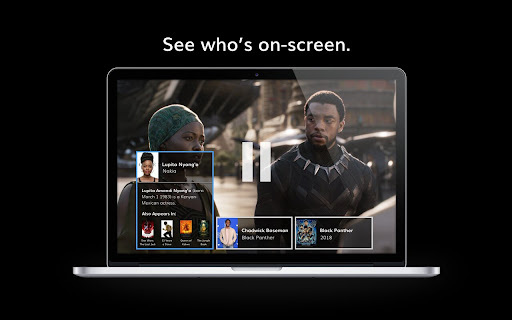
Netflix feature that identifies on-screen actors and actresses.
5.0
Rating
4
Reviews
74
Visits/mo
Screenshots
Overview
Netflix Smart Screen is an innovative feature that automatically identifies and displays the names of actors and actresses appearing on screen during Netflix content playback. This allows viewers to quickly learn more about the performers they are watching, enhancing their viewing experience and providing instant access to information about the cast.
How to Use
The Smart Screen feature activates automatically during Netflix playback. Simply watch the content, and the names of the actors and actresses currently on screen will be displayed. No manual activation is required.
Core Features
Automatic on-screen actor/actress identification
Use Cases
- 1 Instantly identify actors and actresses while watching Netflix content.
Frequently Asked Questions
Q:How do I activate Smart Screen on Netflix? A:Install the extension, open a Netflix title, and the Smart Screen overlay activates automatically to identify actors appearing on screen. Q:Is Smart Screen available on all devices? A:As a Chrome extension, Smart Screen currently works only on desktop Chrome browsers where Netflix is playing, not on TVs or native mobile apps. Q:How accurate is the actor/actress identification? A:Identification is generally reliable for well-known performers using face recognition against public databases, but may occasionally miss lesser-known cast members.
For details, please visit the official website of Netflix Smart Screen - Chrome Extension.
Quick Info
- Category
- Image Analysis
- Subcategory
- AI Image Recognition
- Added on
- Feb 08 2022
- Monthly Visits
- 74
- Rating
- 5.0 / 5.0
- Reviews
- 4
Official Links
Related Tools

MealSnap: AI meal log journal
5.0 AI Image Scanning

AliExpress Image Search
5.0 AI Image Recognition

Limory - Live Memory AR
5.0 AI Image Recognition

HopShop
5.0 AI Image Recognition

Poly
5.0 AI Image Recognition

Alt Text Generator AI
5.0 AI Writing Assistants

deAPI
5.0 AI Voice Generator

Nikaru
5.0 AI OCR