Maken Similarity Service Browser Extension - Chrome Extension
Browser extension integrating Maken similarity service into the National Library of Norway's website.
Screenshots
Overview
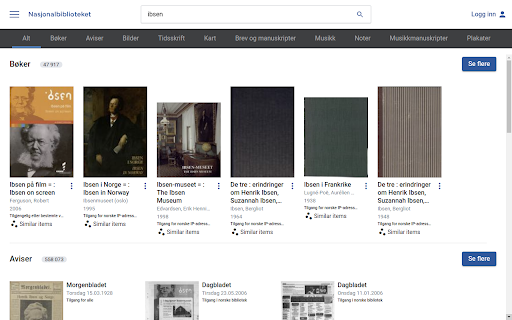
The Maken Similarity Service browser extension integrates a similarity detection tool directly into the National Library of Norway's website. Designed for researchers and readers exploring large digital archives, this extension works alongside the library's online collection to highlight related texts or documents based on content similarity. It streamlines the process of discovering connections between materials, helping users uncover themes, borrowings, or influences across works. For those engaged in literary analysis, historical research, or academic study, this extension adds a powerful layer of exploration to the library's existing search functionality.
How to Use
Install the extension and browse the National Library of Norway's site. Click the Maken integration icon on relevant pages to trigger similarity searches, which surface related content and resources directly within your current view.
Core Features
Use Cases
- 1 Discovering related books and images within the National Library of Norway's collection.
Frequently Asked Questions
What is the purpose of the "Lignende gjenstander" button?
Where does the data for similar items come from?
Does this extension require a separate account?
Quick Info
- Category
- Image Analysis
- Subcategory
- AI Image Recognition
- Added on
- Sep 13 2022
- Monthly Visits
- 9
- Rating
- 0.0 / 5.0
Official Links
Related Tools

MealSnap: AI meal log journal

AliExpress Image Search

Limory - Live Memory AR
CamoCopy

HopShop

Poly

Alt Text Generator AI
