Optical Character Recognition - Chrome Extension
A tool to extract text from images, videos, or PDFs using OCR technology.
Screenshots
Overview
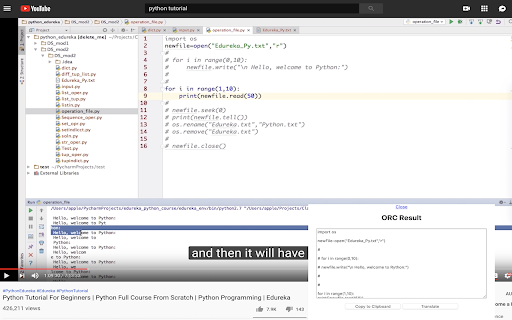
Optical Character Recognition - Chrome Extension is a versatile browser tool that extracts text from images, videos, and PDFs. By leveraging OCR technology, it enables users to capture and copy text that would otherwise be inaccessible, such as text within a video frame or a scanned PDF. This makes it a valuable tool for journalists, researchers, and students who work with multimedia sources. The extension aims to provide a seamless, in-browser experience, allowing users to quickly retrieve text from various formats without disrupting their workflow.
How to Use
1. Click the icon, then select the area/image containing the text. 2. Wait until the tool extracts the text for you. 3. Extracted result will show in a text box. You can then click the copy button to load it into your Clipboard and Ctrl + V to paste it anywhere. 4. There is an option to translate the extracted text into your selected language. 5. You can define the ORC language and targeted translation languages on the options page.
Core Features
Use Cases
- 1 Copy text from YouTube videos
- 2 Extract text from image-formatted tutorials
- 3 Convert image-based documents to editable text
Frequently Asked Questions
Q:How do I use this tool? A:Click the extension icon, select the image, video frame, or PDF area you want to read, and the OCR tool extracts the text instantly.
Quick Info
- Category
- Image Analysis
- Subcategory
- AI OCR
- Added on
- Sep 17 2022
- Monthly Visits
- 735
- Rating
- 1.8 / 5.0
- Reviews
- 6