PixelSense - Photo Editor
Powerful iOS photo editor with RAW support and AI enhancements.
5.0
Rating
2
Saved
--
Visits/mo
Screenshots
Overview
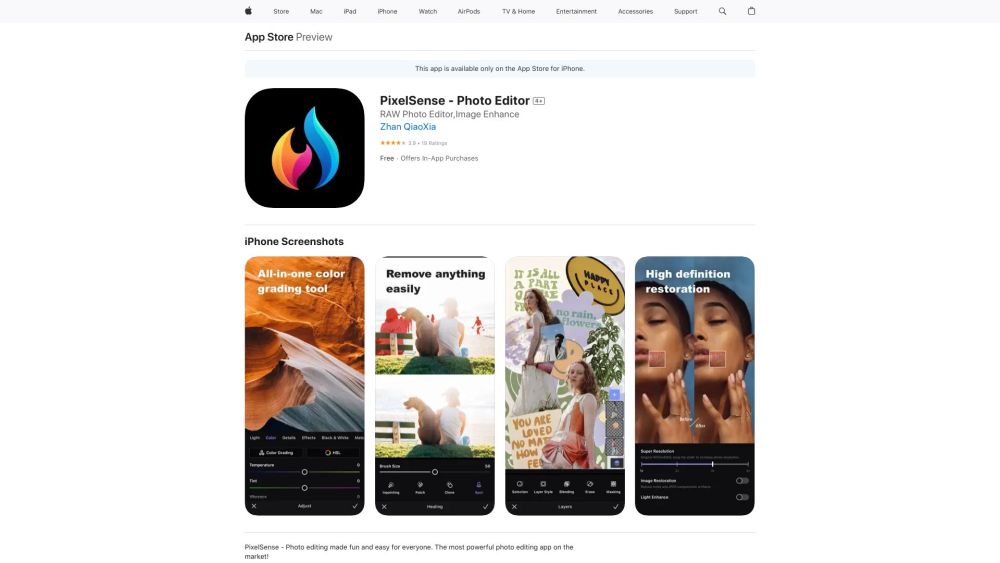
PixelSense is a powerful iOS photo editor built for those who demand precision and control. It offers native RAW file support, ensuring professional-grade editing fidelity, alongside AI-driven enhancements that simplify complex adjustments. This combination of deep technical capability and intelligent automation makes it suitable for both experienced photographers who want full manual control and casual iPhone users looking to quickly elevate their shots.
How to Use
Open PixelSense on iOS, import a RAW or standard photo, and use AI enhancements to adjust exposure, color, and detail. For more control, manually edit, then save or share the final image directly from your device.
Core Features
RAW format support AI-powered photo enhancements Manual editing tools iOS-native interface Direct sharing options
Use Cases
- 1 Enhance RAW images with professional-grade editing tools.
- 2 Remove unwanted objects or blemishes from photos.
- 3 Create double exposure effects using custom blend modes.
- 4 Transform dull skies with sky replacement feature.
- 5 Increase photo resolution with super resolution feature.
Frequently Asked Questions
Does PixelSense support RAW image editing?
Yes, PixelSense supports RAW image editing, letting you work with full sensor data for maximum quality and control.
Are there in-app purchases in PixelSense?
Yes, PixelSense includes in-app purchases for premium features, while the core editor is available to all users.
What kind of AI enhancements does PixelSense offer?
PixelSense offers AI-powered enhancements that automatically improve exposure, color, and detail in your photos.
Can I remove unwanted objects from my photos using PixelSense?
Yes, PixelSense includes AI tools for removing unwanted objects from your photos.
Quick Info
- Category
- Image Generation & Editing
- Subcategory
- AI Photo Enhancer
- Added on
- Jul 08 2023
- Monthly Visits
- --
- Rating
- 5.0 / 5.0
- Saved
- 2





