AI Writing & Image Tool - Chrome Extension
AI-powered writing and image editing tool with ChatGPT and SD integration.
Screenshots
Overview
AI Writing & Image Tool is a versatile Chrome extension that brings the power of AI writing and image editing directly into your browser. Integrating ChatGPT for text generation and Stable Diffusion for image creation, this extension provides a seamless workflow for tasks like drafting emails, rewriting content, generating headlines, and creating or editing visuals—all without leaving your current tab. It’s designed for professionals, students, and creatives who need quick, on-the-go assistance while browsing the web. The interface is lightweight and intuitive, allowing users to highlight text for rewriting or invoke the image editor on any webpage. With customizable settings for tone, creativity level, and image style, the tool adapts to individual preferences. This Chrome extension effectively replaces the need to switch between multiple apps, streamlining digital productivity in one convenient package.
How to Use
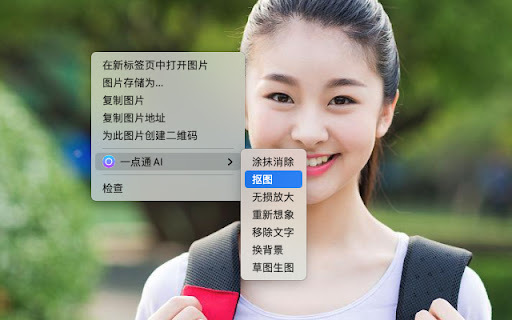
Install the extension from the Chrome Web Store and pin it to your toolbar. Click the icon to open the assistant, then either type a prompt or highlight existing text for AI rewriting. For images, right-click any image and choose the edit or generate option.
Core Features
Use Cases
- 1 Creating engaging content for Xiaohongshu, short videos, and WeChat Moments
- 2 Quickly editing and enhancing images for social media or marketing materials
- 3 Generating images from text descriptions
- 4 Streamlining writing and editing workflows
Frequently Asked Questions
What does this Chrome extension do exactly?
Do I need to have ChatGPT or Stable Diffusion accounts separately?
Can I use it on any website?
Quick Info
- Category
- Image Generation & Editing
- Subcategory
- Text to Image
- Added on
- Nov 13 2023
- Monthly Visits
- 97
- Rating
- 1.0 / 5.0
- Reviews
- 1


