Talk Time for Google Meet
Tracks speaking time in Google Meet, ensuring balanced participation and inclusivity.
5.0
Rating
Screenshots
Overview
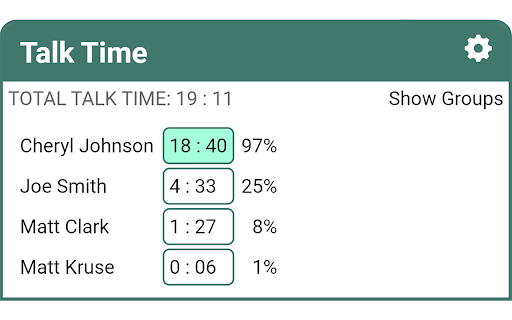
Talk Time for Google Meet automatically detects when each participant in a meeting speaks, and tracks the total speaking time for each person. It also allows you to arbitrarily group participants to combine their time and track it together. This allows leaders to make sure they are not hogging the conversation, companies to make sure they are letting their clients speak, teachers to make sure each student is heard, and anyone focused on diversity to make sure each perspective is heard.
How to Use
Talk Time for Google Meet automatically tracks speaking time during meetings. Group participants to analyze combined speaking time.
Core Features
Automatic detection and tracking of speaking time for each participant Grouping of participants to track combined speaking time
Use Cases
- 1 Ensuring equitable participation in meetings for leaders, companies, and teachers
- 2 Promoting diversity and inclusion by monitoring speaking time of different perspectives
Frequently Asked Questions
What does Talk Time for Google Meet do?
It tracks speaking time in Google Meet, helping ensure balanced participation and inclusivity in meetings.
Can I group participants together?
Yes, you can group participants together so their speaking time is tracked and viewed as a group.
Why is tracking speaking time important?
Tracking speaking time reveals who is dominating a meeting and who is not getting a chance to speak, supporting balanced, inclusive discussions.
Quick Info
- Category
- Voice Generation & Conversion
- Subcategory
- AI Speech Recognition
- Rating
- 5.0 / 5.0