Voiceboost - Chrome Extension
Chrome extension for voice-controlled ChatGPT interaction.
3.5
Rating
2
Reviews
57
Visits/mo
Screenshots
Overview
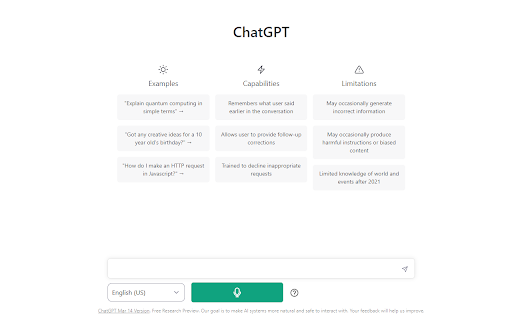
Voiceboost is a Chrome extension that allows users to interact with ChatGPT using voice control. It adds a button under the input area that, when clicked, captures the user's spoken question and sends it to ChatGPT for a response. This provides a hands-free alternative to typing.
How to Use
Click the button added by the extension under the input area to record your voice input. Alternatively, use the keyboard shortcuts: Ctrl+Shift+S (Windows) or Command+Shift+S (Mac) to start recording, and Ctrl+Shift+E (Windows) or Command+Shift+E (Mac) to stop and submit. Ensure microphone permissions are granted when prompted.
Core Features
Voice input for ChatGPT Keyboard shortcuts for voice capture and submission
Use Cases
- 1 Hands-free interaction with ChatGPT
- 2 Dictating questions and prompts to ChatGPT
Frequently Asked Questions
How do I start recording my voice?
Open the Voiceboost extension and click the microphone button to start recording. A recording indicator shows that the extension is listening.
How do I stop recording and submit my voice input?
Click the microphone button again to stop, and your speech is transcribed and sent to ChatGPT automatically. You can edit the text before submitting if needed.
Do I need to grant microphone permissions?
Yes, the extension needs microphone access to capture your voice. Chrome shows a permission prompt the first time you use it.
Quick Info
- Category
- Voice Generation & Conversion
- Subcategory
- AI Speech-to-Text
- Added on
- Sep 05 2024
- Monthly Visits
- 57
- Rating
- 3.5 / 5.0
- Reviews
- 2