SlidesPro - Chrome Extension
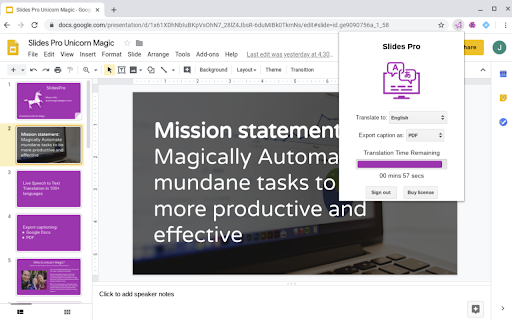
SlidesPro translates speech to text in 100+ languages during Google Slides presentations and exports captions.
Screenshots
Overview
SlidesPro is a Chrome extension designed to make Google Slides presentations more accessible and inclusive. It captures spoken words in real time and converts them into text captions, supporting over 100 languages. This tool is ideal for educators, public speakers, and business professionals who want to ensure their audience can follow along, whether due to hearing impairments, language barriers, or noisy environments. The exported captions also serve as handy post-presentation notes, letting presenters revisit their delivery or share accurate transcripts with attendees who missed the session.
How to Use
Install SlidesPro and connect it to your Google Slides account. During a presentation, enable the extension; it translates your speech into text captions in over 100 languages in real time. After the presentation, export the captions as a file for reference or sharing.
Core Features
Use Cases
- 1 Presenting Google Slides to a multilingual audience.
- 2 Creating accessible presentations for individuals with hearing impairments.
- 3 Generating transcripts of presentations in multiple languages.
Frequently Asked Questions
What languages does SlidesPro support?
Can I export the translated captions?
Does SlidesPro work with all versions of Google Slides?
Quick Info
- Category
- Voice Generation & Conversion
- Subcategory
- AI Speech-to-Text
- Added on
- Feb 04 2024
- Monthly Visits
- 80.0K
- Rating
- 5.0 / 5.0
- Reviews
- 2
- Saved
- 3