Google Meet - Chrome Extension
Google Meet is a video conferencing service for business and enterprise use.
Screenshots
Overview
Google Meet is a professional video conferencing service designed for business and enterprise communication. It enables high-quality video calls, screen sharing, and real-time collaboration, all integrated with Google Workspace for scheduling and team coordination. Suitable for remote teams, client meetings, webinars, and internal stand-ups, it provides a reliable platform for connecting people across locations. The Chrome extension simplifies access and enhances meeting scheduling directly from your browser.
How to Use
Install the extension from the Chrome Web Store, then click the Google Meet icon to start or join a video meeting directly from your browser. You can schedule meetings, share your screen, and invite participants via a link, all without leaving Chrome.
Core Features
Use Cases
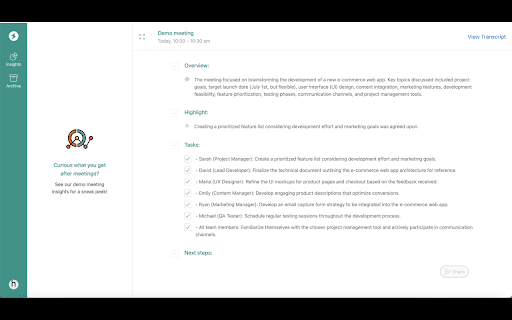
- 1 Capture insights and action items from Google Meet calls with real-time transcriptions and intelligent analysis.
Frequently Asked Questions
Do I need a Google account to use Google Meet?
Does Google Meet offer real-time transcriptions?
Can Google Meet analyze the content of my meetings?
Quick Info
- Category
- Voice Generation & Conversion
- Subcategory
- AI Speech-to-Text
- Added on
- May 20 2024
- Monthly Visits
- 2
- Rating
- 5.0 / 5.0
- Reviews
- 3






